

Personalization Help
How to Send Text to TrophyKits
Ordering trophy kits and nameplates with different text is easy. For larger orders, uploading your text file after checkout is usually the fastest and most accurate option.
Important
Text will be personalized exactly as provided. Please check spelling, capitalization, names, numbers, and line breaks before submitting.
Enter “will upload file” when ordering
If you are ordering multiples of the same item with different text on each item, enter “will upload file” in the text field.
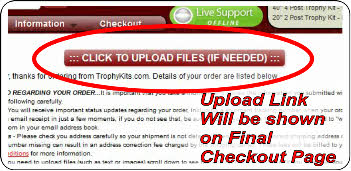
After you complete your order and payment, an upload link will appear on your receipt page.
Please do not email text unless we specifically request it.
Prepare your text file
We accept .doc, .docx, .pdf, and .txt files.
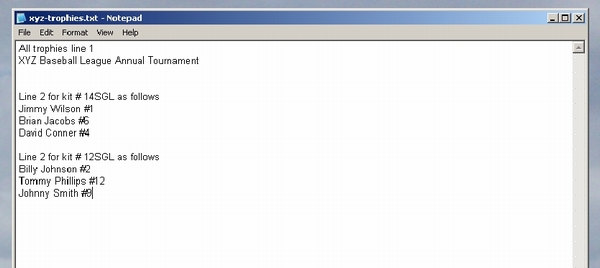
A plain .txt file created with Notepad is preferred because it avoids extra formatting, fonts, columns, and alignment.
Please do not center your text or list it in multiple columns. We will center and size the text appropriately.
Upload text that can be copied
PDF files are acceptable, but they must contain selectable text. Please do not upload a photo, scan, screenshot, or image of the text.
We need text in a format that can be copied and pasted into our personalization software.
Having trouble uploading?
Use our text submission form if you are having trouble uploading files. Please follow the same formatting tips shown here.
Go to Text Submission FormWhere the upload link appears
After checkout is complete, your receipt page will show the upload link if needed.
Example of a good text file
A simple line-by-line Notepad file is ideal. Avoid columns, centered text, or images of text.